circle-exclamationHow do i fix my Error & bug ?

Possible problems and ways to solve them:

  • All antiviruses must be disabled, and you must also disable Windows Defender (Real-time Protection).

  • It is necessary to remove FaceIT and Riot Vanguard anti-cheats (Valorant anti-cheat). Anti-cheats must be removed through the "Software Uninstalling", you cannot just delete the shortcut or folder with the anti-cheat.

Another Known possible difficulties and methods for fixing them:

  • The most popular problem is the enabled Windows Defender / Antivirus. Disable Windows Defender completely (as we described earlier) and uninstall other antivirus software.

  • Update Visual C++ libraries, you can download them from this linkarrow-up-right.

  • You should also update DirectX, you can download it from this linkarrow-up-right.

  • FaceIt and Riot Vanguard anti-cheats installed on your PC also interfere with the software. Remove them using "Add or Remove Programs".

  • If you have Windows 11, you must disable kernel isolation and use this fixarrow-up-right.

  • To run the cheat, you must also disable Reputation-based Protection (SmartScreen):

    1. Open the start(windows) menu and search for “Reputation-Based Protection.” Open this window.
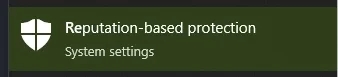
    2. In the window that opens, disable all options.

  • Also make sure you have "Borderless" or "Windowed" screen mode set in the game settings.

  • Disable Intel Rapid Storage Technology in BIOS.

Last updated